
Lab Report: Geohash Community Node for n8n
Gary Ritchie, May 15, 2026
A custom n8n community node that fills a gap in spatial data handling – encoding and decoding Geohashes, calculating bounds, and finding adjacent cells, all without external services. Based on latlon-geohash, this project delivers the geohash engine to n8n.
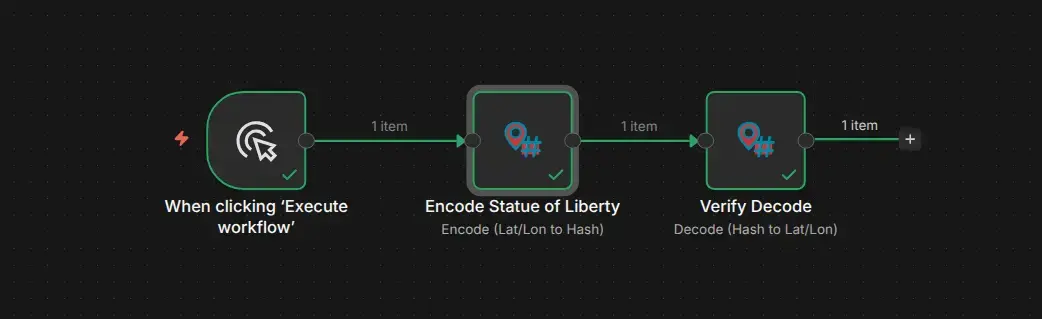
The Problem
Business automation workflows frequently deal with location data – addresses, GPS coordinates, delivery zones – but n8n’s built-in node set lacks any native spatial operations. When a client project needed to work with geographic proximity (grouping nearby points, checking if locations fall within zones, mapping coordinates to grid cells), the options were limited:
- Write custom JavaScript for each workflow (fragile, untestable, repeated across projects)
- Call an external API or webhook service (added latency, dependency, and cost)
- Pre-process everything in a spreadsheet or spatial database (loss of workflow integrity)
None of those felt right for a production automation pipeline.
The Approach
Rather than patch individual workflows with ad-hoc scripts, I built a reusable community node. The idea was to make spatial operations feel as natural as any built-in n8n node – a simple drag, a few parameters, and the data transforms inline.
Operations
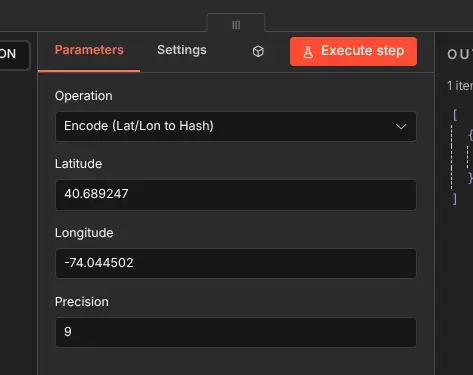
The node supports five operations:
- Encode – Convert a latitude/longitude pair into a Geohash string of configurable precision
- Decode – Convert a Geohash string back into latitude and longitude (center point of the cell)
- Get Bounds – Return the southwest and northeast corners of a Geohash cell
- Get Adjacent – Find the neighboring cell in a specific direction (north, south, east, or west)
- Get Neighbours – Return all eight surrounding cells at once
Each operation is designed to work independently, but they chain naturally – encode a coordinate, get its bounds, then find adjacent cells for a proximity check.
Implementation Notes
The geohash encoding/decoding algorithm runs entirely client-side, no external dependencies. The encoding follows the standard geohash spec (see Wikipedia: Geohash for the full algorithm description), and the adjacency logic handles border-crossing edge cases (when moving between geohash rows or columns requires propagating the change up the parent chain).
For n8n Cloud compatibility, the implementation is dependency-free – no npm install needed. The code is self-contained to avoid installation friction on shared hosting.
Alternative: Code Node Workflow
Not all n8n installations support community nodes. For environments that can’t install the custom node, there’s a drop-in alternative workflow containing Code Node implementations of every operation. It’s available in the repository:
- n8n-nodes-geohash on GitHub – the Code Node workflows are included as
Geohash_Alternative_Workflow.json
Import the JSON into your n8n instance and you get the same five operations (encode, decode, bounds, adjacent, neighbours) – just implemented as JavaScript in Code Nodes instead of a community node.
Why Geohash?
Geohash is a simple but powerful system. It takes a lat/lon coordinate and turns it into a short string – and that string encodes a box, not just a point. Higher precision means smaller boxes. Two geohashes that share a long prefix are geographically close. That property makes it useful for:
- Proximity checks without complex distance calculations
- Spatial indexing in databases that don’t support GIS natively
- Zone grouping – bucketing nearby points into shared grid cells
- Boundary queries – "give me everything within this area"
For business automation, where workflows need to reason about location without a full GIS stack, geohash hits the sweet spot between simplicity and utility.
Installation & Use
The node is available as a community node for self-hosted n8n instances. Cloud users should use the Code Node workflow instead.
Installation (self-hosted)
- Go to Settings > Community Nodes
- Select Install
- Enter
n8n-nodes-geohash - Search for node "Geohash"
Installation (Cloud / restricted environments)
- Download
Geohash_Alternative_Workflow.jsonfrom the GitHub repo - Import it into your n8n instance
- Each operation is a standalone Code Node – use as a reference or copy the individual nodes into your own workflows
This started as a practical tool for a specific client project, but the problem it solves is universal enough that it’s useful across any automation pipeline touching location data. If you’re working with geospatial data in n8n I hope you agree.
Cheers,
Gary
gary@lyonritchie.com
Bluesky,
LinkedIn,
Mastodon,
X